
Free Online Sentence Counter Tool
Count sentences instantly with our free online sentence counter tool. Perfect for writers, students, and professionals.
0 sentences
0 paragraphs
0 characters
0 words
0 characters without space

Free Online Sentence Counter – Count Sentences, Words, Paragraphs & Characters Instantly
Find out how many sentences are in your content instantly with this simple, easy-to-use sentence counter. I designed this tool for writers, students, professionals, and bloggers like me who want a quick way to understand and analyze their writing.
It counts more than just sentences. You can also track paragraphs, words, and characters, with an option to count characters with or without spaces. The tool also gives you useful insights such as estimated reading time, speaking time, and the length of your longest sentence.
Designed for Humans by a Human 🙂
Created entirely by me, a human, without AI involvement, this tool is designed with humans in mind. If you ever encounter a bug or error, feel free to reach out to me, and I'll ensure it's fixed promptly.
What it Does?
1) Counts sentences in any text
It will instantly count sentences in any text, perfect for writers, students, and professionals who want fast, reliable results. Simply copy and paste your content into the box, and the tool does the rest.
2) Word Frequency Analysis
It analyzes the frequency of words in your text, helping you identify commonly used terms. This feature is valuable for optimizing content for SEO or ensuring balanced word usage.
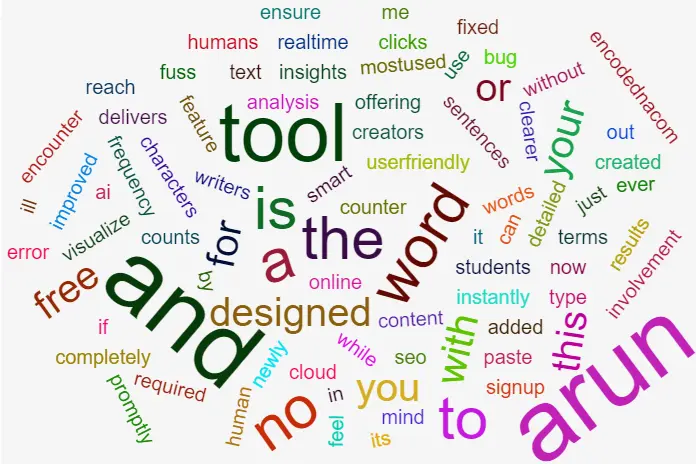
3) Word Cloud Visualization new
This newly added feature transforms your word frequency data into a dynamic word cloud, offering a visual snapshot of your most prominent keywords for quick insights and improved readability.
4) Ease of Use
👉 The tool is designed with simplicity in mind. Its user-friendly interface allows anyone, from beginners to professionals, to use it effortlessly without any technical knowledge.
5) Free and Accessible
The Sentence Counter Tool is completely free to use and does not require any sign-up, making it accessible to a wide audience.
6) Human-Centric Design
I have created this tool. The tool emphasizes a personal touch and is specifically designed for human users, without any AI involvement.
7) Bug Reporting and Maintenance
I actively encourage users to share any bugs or errors they encounter, so the tool can be promptly updated and refined to better meet their needs.
Frequently Asked Questions
1) How Does It Work?
Just type or paste your content into the text box. The tool automatically detects and counts sentences in any type of text, making it easier to measure readability, structure, and flow. No clicks needed.
2) Who Should Use This Tool?
It is ideal for,
• Writers & Bloggers – to polish drafts, check sentence flow, and maintain readability.
• Students – to meet assignment requirements, track sentence length, and stay within guidelines.
• Teachers & Educators – to evaluate student work and provide feedback on structure.
The tool is useful and essential for anyone who wants to save time, improve efficiency, and make their writing more effective.
3) Is It Free to Use?
Yes, adsolutely. The Sentence Counter Tool is completely free and requires no sign-up. Just visit the page and start typing.
4) What If I Find a Bug?
This tool is human-made and actively maintained. If you spot a bug, just reach out and I'll fix it promptly!
🔨 Related Tools
⏱ The Word Counter – Free Online Word Counter Tool for Writers, Students & SEO.
📝 My Fancy Notepad – A distraction‑free online writing space.
🎲 Random Word Generator – Spark creativity with random words and phrases.
📊 Graph Maker – Create simple charts and graphs online.
🛠️ More Free Tools
Pick Colors from any Image
Generate color palettes from an image upto 10 colors using this free tool. Extract Colors.
Color Palette Generator from Hex
Generate harmonious color palettes from a base color. Generate Palettes.
Hex to RGB Converter
Convert color codes between HEX and RGB formats. Try it.
HTML Table Generator with or without CSS
Effortlessly create HTML table code for your website. Enhance your site's design in seconds. Generate Tables.
Percentage Calculator
Find percentages, change, discounts, and more. Calculate Percentage.
Random Word Generator
Spark ideas with instantly generated words and phrases. Try our Random Word Generator.
HTML and CSS Minifier
Compress HTML and inline CSS for speed and SEO. Try it here.
Online JS Editor
Edit and refine your JavaScript before embedding. Open editor.
Word Counter
Instantly count words, characters, reading time, and visualize word frequency with a word cloud. Count here.
Crop Image Without Losing Quality
Optimize images alongside your HTML for faster load times. Resize here.
My Fancy Notepad
Minimal writing space with just‑enough features. Write here.
Sentence and Pragraph Counter
Count sentences instantly with our free online sentence counter tool. Count here.
All Tools
Fast, browser‑based utilities for developers, designers, and creators. No sign‑up, no downloads. Go to All Tools.