
Sales table
Create the table and Insert some data into it.
CREATE TABLE dbo.Sales(
    SalesID INT PRIMARY KEY NOT NULL,
    AgentID INT NOT NULL,
    Quantity INT NOT NULL,
    Price NUMERIC (18, 2) NOT NULL,
    SalesDate DATETIME NOT NULL
)
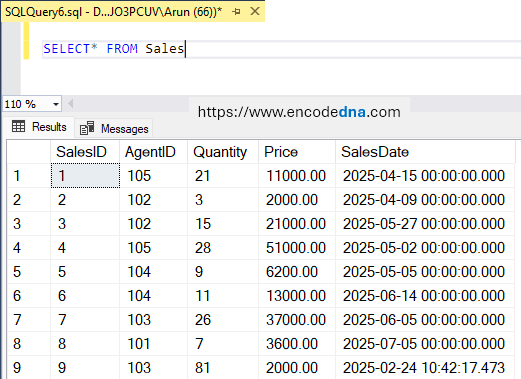
As shown in the image above, the Sales table contains sales records for five different agents. In this example, the goal is to retrieve the last record for each agent. I'm not interested in calculating the total sales per agent. Instead, I want to identify the most recent transaction for each agent. For example, Agents 102 and 105 each have two records, but I only want to retrieve their latest transaction.
SQL Query
SELECT *
FROM (
    SELECT *,
           ROW_NUMBER() OVER (
               PARTITION BY AgentID
               ORDER BY SalesDate DESC
           ) AS rn
    FROM dbo.Sales
) t
WHERE rn = 1;
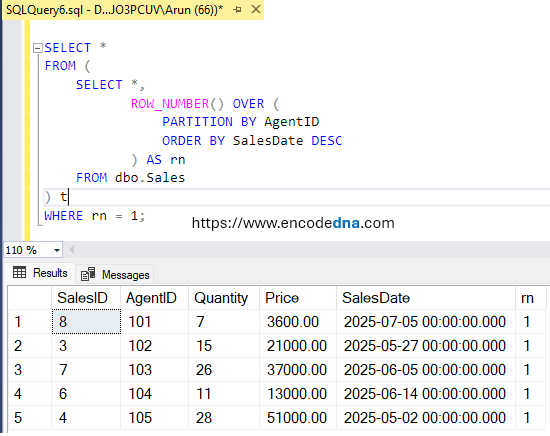
The Output:
Explaining the Query
This query uses the ROW_NUMBER() function to assign a unique sequential number to each sales record within its respective agent group. The PARTITION BY AgentID clause creates a separate ranking for each agent, while ORDER BY SalesDate DESC sorts each agent's transactions from the latest to the oldest.
As a result, the most recent transaction for each agent receives a row number of 1. The outer query then filters the results using WHERE rn = 1 to return only the latest sales record for every agent. This approach is useful when you need the complete details of the most recent record from each group rather than just an aggregated value like total sales.