In this tutorial, we'll take it a step further. Instead of just listing employees, I'll show you a query that will let you see how many employees were hired in each of the last 12 months.
Let's start with the query, and then I'll explain how it works.
Create a Table
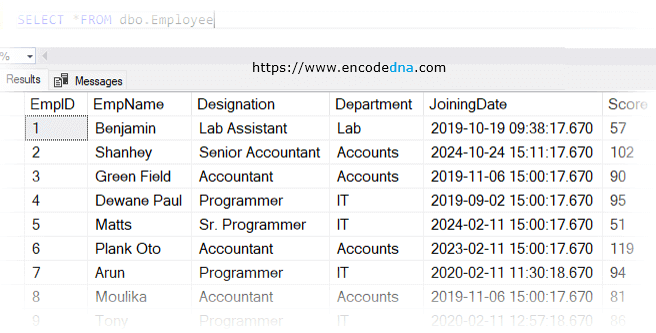
Let us assume, we have an "employee" table with some sample data. The key column we'll focus on is JoiningDate, which records when each employee was hired. You can use this sample table. It will save time and make the example easier to understand.
Note: Make sure you have some latest entries in the table, especially JoiningDate.
CREATE TABLE Employee
    (EmpID INT NOT NULL ,
        EmpName VARCHAR(50) NOT NULL,
        Designation VARCHAR(50) NULL,
        Department VARCHAR(50) NULL,
        JoiningDate DATETIME NULL,
        CONSTRAINT [PK_Employee] PRIMARY KEY CLUSTERED (EmpID)
    )
The SQL Query
The query is simple. Here I am using the FORMAT and DATENAME functions to group by "month" and "year". These two are built-in functions in SQL Server.
SELECT FORMAT(JoiningDate, 'MM-yyyy') AS MonthHired,
    COUNT(*) AS EmployeesHired
FROM Employee
WHERE JoiningDate >= DATEADD(MONTH, -12, GETDATE())
GROUP BY FORMAT(JoiningDate, 'MM-yyyy')
ORDER BY MonthHired
Expected Result:
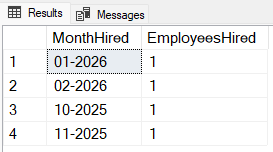
1) The FORMAT() function (in the above query) converts the dates (in the table) into "MM-yyyy" format (month in number and the year). You can better understand by this example.
SELECT FORMAT(GETDATE(), 'MM-yyyy') -- Possible result: 02-2026
👉 You may also like: How to Convert Month Number in a Date to Month Name in SQL Server
2) The COUNT(*) counts the number of employees hired in that month.
3) Since you are using an aggregate function (COUNT(*)) in the query, you must include a GROUP BY clause.
🚀 Here's a list of TOP SQL Server Aggregate Functions with Examples
4) The ORDER BY clause ensures the results are in chronological order.
5) Finally, there's a WHERE clause that filter employees hired in the last 12 months.
WHERE JoiningDate >= DATEADD(MONTH, -12, GETDATE())
Convert Month Number into Month Name
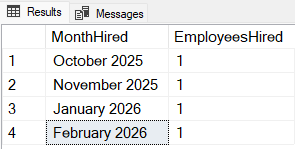
Here's an alternative query if you'd like the results to display the month name along with the year instead of just the numeric month value.
SELECT DATENAME(MONTH, JoiningDate) + ' ' + CAST(YEAR(JoiningDate) AS VARCHAR(4)) AS MonthHired,
    COUNT(*) AS EmployeesHired
FROM Employee
WHERE JoiningDate >= DATEADD(MONTH, -12, GETDATE())
GROUP BY YEAR(JoiningDate), MONTH(JoiningDate), Employee.JoiningDate
ORDER BY YEAR(JoiningDate), MONTH(JoiningDate)
Expected Result: