
That's where a JSON Beautifier becomes essential. 👇
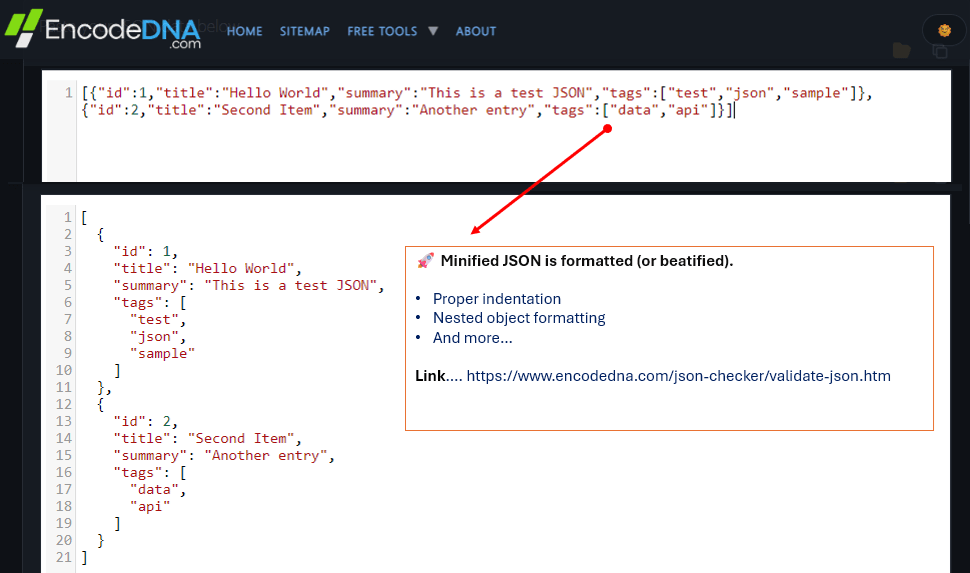
A JSON Beautifier formats messy or minified JSON into a clean, structured, and readable layout with proper indentation and spacing. Whether you are a developer debugging APIs or a data analyst reviewing payloads, beautified JSON saves time and reduces errors.
🚀 One useful online tool for formatting and validating JSON is this JSON Beautifier.
What is a JSON Beautifier?
A JSON Beautifier is a tool that converts unformatted JSON into a human-readable structure. It automatically adds:
- 1. Proper indentation
- 2. Line breaks
- 3. Nested object formatting
- 4. Consistent spacing
- 5. Syntax organization
For example, a raw JSON looks like this:
{"name":"Arun Banik","role":"Developer","skills":["JavaScript","API","JSON"]}It becomes:
[
  {
    "name": "Arun Banik",
    "role": "Developer",
    "skills": [
      "JavaScript",
      "API",
      "JSON"
    ]
  }
]
Now its much easier to understand, debug and maintain.
What are the Key Benefits of Beautifying JSON
1. Improves Readability
Minified JSON is often difficult to scan, especially when dealing with deeply nested objects or large API responses. Beautified JSON helps developers quickly identify:
- 1. Keys and values
- 2. Nested arrays
- 3. Missing braces (or brackets)
- 4. Data hierarchy
The data should always be readable. It improves productivity, because you don't have to break your head debuging it.
2. Makes Debugging Faster
When APIs fail or data structures break, developers often inspect actual JSON data to locate issues. A JSON Beautifier helps by clearly exposing:
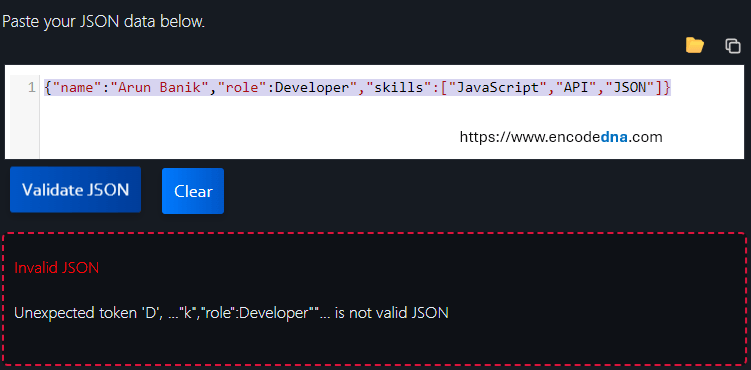
- 1. Syntax errors:
For example, as shown in the below image, the value Developer is missing a opening double quote. The JSON validator instantly detected and highlighted the syntax error.
- 2. Missing commas
- 3. Invalid brackets
- 4. Incorrect nesting
- 5. Duplicate keys:
For example, the key role appears twice. These are called duplicate keys.{ "name": "John", "role": "Developer", "role": "Manager", "skills": ["JavaScript", "JSON"] } - Becomes (after using JSON beautifier),
[
  {
    "name": "John",
    "role": "Manager",
    "skills": [
      "JavaScript",
      "JSON"
    ]
  }
]
This definitely speeds up troubleshooting and reduces debugging time significantly.
3. Helps Validate JSON Structure
Many online JSON Beautifiers also include validation features. This allows users to check whether JSON syntax is valid before using it in applications or APIs.
Our JSON beautifier and validator can both format and validate JSON data online, making it useful for developers, testers, and analysts.
4. It is essential for API Development and Testing
Applications today, rely heavily on REST APIs and JSON based communication.
Beautified JSON helps developers during:
- 1. API testing
- 2. Request inspection
- 3. Analysing response
- 4. Backend development
Readable data make it easier to verify whether APIs return expected results.
5. Improves Team Collaboration
Data teams and developers often share JSON files during development, testing, or analytics workflows.
Properly formatted JSON improves collaboration because team members can:
- 1. Easily understand data structures
- 2. Review data faster
- 3. Quickly spot issues (if any)
- 4. Edit configurations safely
Always remember, clean formating reduces confusion across teams.
6. Simplifies Large JSON Files
Large JSON files can be slow because JSON is a text-based format that requires intensive parsing and consumes significant memory due to repeated keys and nested structures.
It is explained beautifully here.
So, always beautify (or format) your JSON data, because it helps users navigate:
- 1. Complex datasets
- 2. Configuration files
- 3. Database exports
- 4. API responses
- 5. Log outputs
It Reduces Human Errors
👉 This is the most important part (out of experience, I am saying).
Working with unformatted JSON increases the risk of accidental editing mistakes, especially in large or complex files. A JSON Beautifier organizes the data with proper indentation and structure, making it easier to spot misplaced brackets, incorrect nesting, missing commas, or accidental value changes. Clear formatting improves accuracy and reduces errors when editing JSON manually.
Our JSON Beautifier Tool offers a simple interface for formatting and validating JSON online without installation.
Conclusion
Beautifying JSON is more than just improving appearance. It improves readability, accelerates debugging, reduces syntax errors (very important), and improves collaboration across development and data teams.
As APIs and data driven applications continue to grow, using a reliable JSON Beautifier becomes an essential part of modern workflows.
If you regularly work with JSON files, APIs, or structured datasets, our JSON Beautifier and Validator can help streamline your development and debugging process. Built entirely from scratch without AI generated code, the tool is designed for speed, accuracy, and ease of use. Give it a try.
Example of a Small but Complex Nested JSON Structure
You can also test the tool by minifying this JSON using any online JSON minifier and then pasting the compressed output into our JSON Beautifier Tool to see how accurately it restores proper formatting and indentation.
{
  "user": {
    "id": 101,
    "profile": {
      "name": "John Doe",
      "contacts": {
        "email": "john@example.com",
        "phones": [
          {
            "type": "work",
            "number": "+1-555-1000"
          },
          {
            "type": "home",
            "number": "+1-555-2000"
          }
        ]
      }
    },
    "projects": [
      {
        "title": "API Dashboard",
        "status": "active",
        "tech": ["Node.js", "MongoDB", "Docker"]
      },
      {
        "title": "Analytics Engine",
        "status": "paused",
        "settings": {
          "region": "US",
          "backup": true
        }
      }
    ]
  }
}
Thanks. 👍
📖 Read Next
- How to Populate a SELECT Dropdown with JSON Data using JavaScript - Two Simple Examples
- Build HTML Table from JSON Using Async/Await
- Create Dynamic Tables with JavaScript & Save Data Like a Pro
- Build a Simple CRUD App with Vanilla JavaScript
- Lightweight JavaScript Bot 🤖 Detection Script
- Create animated column Charts using Highcharts API with data extracted from JSON file
- 🚀 Ready to code? Try the Online JavaScript Editor or Compress HTML and CSS instantly for faster load times using our 📦 HTML Minifier.