
Last Updated: 22nd June 2026
If you have worked with SQL Server Database, then I am sure you know how to create a table, add columns, keys etc. In SQL Server, you can create a table either by writing a CREATE TABLE statement or by using SQL Server Management Studio (SSMS). This article will be particularly useful for ASP.NET developers, as it demonstrates how to dynamically create a table in SQL Server using both ASP.NET C# and VB.NET, complete with practical examples.Using ADO.NET, you can execute virtually any SQL Server statement programmatically. This capability is especially useful when building applications that allow users to dynamically create database objects, such as tables, columns, or indexes. While users interact with a simple interface, all the underlying SQL operations are handled seamlessly behind the scenes by your application.
Usually, this feature is available to Admins in an application, be it e-commerce or any app that requires dynamic features.
On the web page, I have three TextBox controls, a Button control, and a HiddenField control. The hidden field is used to store values retrieved from the textboxes (see the script below). When the button is clicked, the code-behind reads the table name and column names from the hidden field and uses them to create the table dynamically.
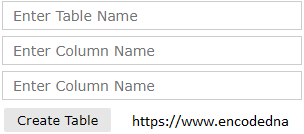
<div>

    <%-- Textboxes to input table name, and two columns --%>
    <asp:TextBox ID="tbTable" placeholder="Enter Table Name" runat="server"></asp:TextBox>
    <asp:TextBox ID="tbCol1" CssClass="input" placeholder="Enter Column Name" runat="server"></asp:TextBox>
    <asp:TextBox ID="tbCol2" CssClass="input" placeholder="Enter Column Name" runat="server"></asp:TextBox>

    <%-- Call code behind procedure on button click. --%>
    <asp:Button ID="btCreate" Text="Create Table" runat="server"
        OnClick="CreateTableInSQLSERVER_Click" CssClass="bt" />

    <br /><asp:Label ID="message" runat="server"></asp:Label>

    <%-- A hidden field to hold column names. --%>
    <asp:HiddenField ID="col1" runat="server" />
</div>
Because I am creating the SQL Server table programmatically, the textboxes will provide me with the column names. This simple JavaScript will extract the values from the textboxes and store it in a hidden field, which will be processed by a code behind procedure using C# or VB.NET.
<script>
    document.getElementById('btCreate').addEventListener('click', function () {
        var values = [];

        // GET VALUES FROM THE TEXTBOXES (FOR COLUMNS).
        var inputs = document.querySelectorAll('.input');

        inputs.forEach(function (input) {
            if (input.value.trim() !== '') {
                values.push(input.value);
            }
        });

        // ASSIGN VALUES TO THE HIDDEN FIELD.
        document.getElementById('col1').value = values.join(',');
    });
</script>
using System;
using System.Web;
using System.Web.Services;
using System.Data.SqlClient;

public partial class SiteMaster : System.Web.UI.MasterPage
{
    public void CreateTableInSQLSERVER_Click(object sender, EventArgs e)
    {
        string sConnString = "Data Source=DNA;Persist Security Info=False;" +
           "Initial Catalog=DNA_Classified;User Id=sa;Password=demo;Connect Timeout=30;";

        message.Attributes.Add("style", "border:none;font:14px Verdana;");
        message.Text = "";

        try
        {
            // EXTRACT VALUES (FOR THE COLUMNS) FROM THE HIDDEN FIELD.

            string sFields = col1.Value;

            int iCnt = 0;
            string sColumns = "";
            for (iCnt = 0; iCnt <= sFields.Split(',').Length - 1; iCnt++)
            {
                // CREATE COLUMNS AND ASSIGN DataTypes.
                // (YOU CAN PASS THE DataTypes TOO. SIMPLY ADD A DROPDOWN
                // LIST NEXT TO EACH TEXTBOX FOR COLUMNS, WITH PRE-DEFINED TYPES.)

                if (string.IsNullOrEmpty(sColumns))
                {
                    sColumns = "[" + sFields.Split(',')[iCnt].Replace(" ", "") + "] VARCHAR (100)";
                }
                else
                {
                    sColumns = sColumns + ", [" + sFields.Split(',')[iCnt].Replace(" ", "") + "] VARCHAR (100)";
                }
            }

            using (SqlConnection con = new SqlConnection(sConnString))
            {
                // CREATE TABLE STRUCTURE USING THE COLUMNS AND TABLE NAME.

                string sQuery = null;
                sQuery = "IF OBJECT_ID('dbo." + tbTable.Text.Replace(" ", "_") + "', 'U') IS NULL " +
                    "BEGIN " +
                    "CREATE TABLE [dbo].[" + tbTable.Text.Replace(" ", "_") + "](" +
                    "[" + tbTable.Text.Replace(" ", "_") + "_ID" + "] INT IDENTITY(1,1) NOT NULL CONSTRAINT pk" +
                        tbTable.Text.Replace(" ", "_") + "_ID" + " PRIMARY KEY, " +
                    "[CreateDate] DATETIME, " +
                        sColumns + ")" +
                    " END";

                using (SqlCommand cmd = new SqlCommand(sQuery))
                {
                    cmd.Connection = con;
                    con.Open();

                    cmd.ExecuteNonQuery();
                    con.Close();

                    message.Text = "Table created successfuly.";
                    message.ForeColor = System.Drawing.Color.Green;
                }
            }
        }
        catch (Exception ex)
        {
            message.Text = "There was an error.";
            message.ForeColor = System.Drawing.Color.Green;
        }
        finally
        { }

    }
}
Option Explicit On
Imports System.Data.SqlClient

Partial Class Site
    Inherits System.Web.UI.MasterPage

    Sub CreateTableInSQLSERVER_Click(ByVal sender As Object, ByVal e As EventArgs)

        message.Attributes.Add("style", "border:none;font:14px Verdana;")
        message.Text = ""

        Dim sConnString As String = "Data Source=DNA;Persist Security Info=False;" & _
            "Initial Catalog=DNA_Classified;User Id=sa;Password=demo;Connect Timeout=30;"

        Try
            ' EXTRACT VALUES (FOR THE COLUMNS) FROM THE HIDDEN FIELD.

            Dim sFields As String = col1.Value

            Dim iCnt As Integer = 0
            Dim sColumns As String = ""
            For iCnt = 0 To sFields.Split(",").Length - 1

                ' CREATE COLUMNS AND ASSIGN DataTypes.
                ' (YOU CAN PASS THE DataTypes TOO. SIMPLY ADD A DROPDOWN
                ' LIST NEXT TO EACH TEXTBOX FOR COLUMNS, WITH PRE-DEFINED TYPES.)

                If Trim(sColumns) = "" Then
                    sColumns = "[" & Replace(sFields.Split(",")(iCnt), " ", "") & "] VARCHAR (100)"
                Else
                    sColumns = sColumns & ", [" & Replace(sFields.Split(",")(iCnt), " ", "") & "] VARCHAR (100)"
                End If
            Next

            Using con As SqlConnection = New SqlConnection(sConnString)

                ' CREATE TABLE STRUCTURE USING THE COLUMNS AND TABLE NAME.

                Dim sQuery As String
                sQuery = "IF OBJECT_ID('dbo." & Replace(Trim(tbTable.Text), " ", "_") & "', 'U') IS NULL " & _
                    "BEGIN " & _
                    "CREATE TABLE [dbo].[" & Replace(Trim(tbTable.Text), " ", "_") & "](" & _
                    "[" & Replace(Trim(tbTable.Text), " ", "_") & "_ID" & "] INT IDENTITY(1,1) NOT NULL CONSTRAINT pk" & _
                        Replace(Trim(tbTable.Text), " ", "_") & "_ID" & " PRIMARY KEY, " & _
                    "[CreateDate] DATETIME, " & _
                    sColumns & _
                    ")" & _
                    " END"

                Using cmd As SqlCommand = New SqlCommand(sQuery)
                    With cmd
                        .Connection = con
                        con.Open()

                        cmd.ExecuteNonQuery()
                        con.Close()

                        message.Text = "Table created successfuly."
                        message.ForeColor = Drawing.Color.Green
                    End With
                End Using
            End Using
        Catch ex As Exception
            message.Text = "There was an error."
            message.ForeColor = Drawing.Color.Red
        Finally
            '
        End Try
    End Sub
End Class
Likewise, you can remove a table using the SQL Server DROP TABLE statement. The same technique can also be extended to create and manage other SQL Server objects, including views, stored procedures, and functions, programmatically.
You may also like: Top SQL Server Aggregate Functions Explained with Examples