🚀 By the way,
DDMMYYYY is a date format that tells you how to enter a date. DD stands for the day, MM stands for the month, and YYYY stands for the four-digit year.
For example, if the date is 14 July 2026, you would write it as 14072026.
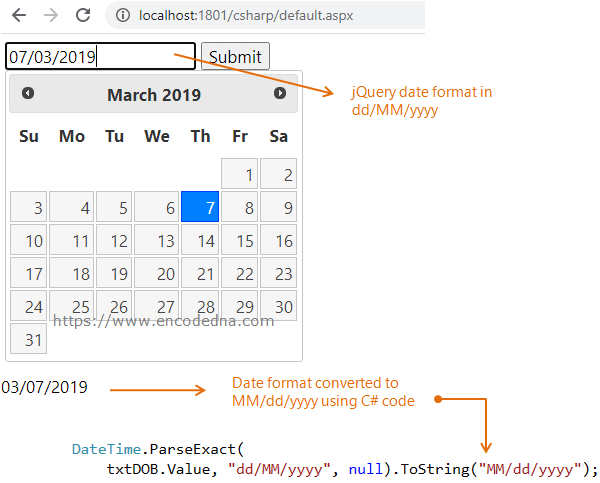
In this tutorial, you'll learn how to easily convert dates from dd/MM/yyyy to MM/dd/yyyy in ASP.NET using both C# and VB.NET. This step-by-step example demonstrates how to handle date format conversion when working with the jQuery Datepicker control, helping you create more flexible and region-friendly ASP.NET applications.
Why Convert Dates to MM/dd/yyyy Format in ASP.NET?
The MM/dd/yyyy date format is commonly required when storing dates in a Microsoft SQL Server table that uses the DATE data type. Using the correct format helps ensure accurate data storage, prevents conversion errors, and improves compatibility between your ASP.NET application and SQL Server database.
In addition to database requirements, there are many other situations where converting dates to the MM/dd/yyyy format becomes essential. For example, some regions and applications follow U.S. date standards, while certain third-party systems, APIs, and reporting tools may only accept dates in this format. Proper date conversion also helps maintain consistency across your application and improves the overall user experience.
👉 In ASP.NET, we can change a date's format using the ParseExact() method of DateTime structure. The method converts a specified string (a date with time) to other date and time formats.
Syntax
DateTime.ParseExact(string s, string format, IFormatProvider provider)
In the markup section, I have a textbox and a button. I am attaching the DatePicker widget to the Input box (textbox) inside the script. I am assigning the date format dd/mm/yy.
<head runat="server">
    <link rel="stylesheet" href="https://code.jquery.com/ui/1.12.0/themes/base/jquery-ui.css">
    <script src="https://code.jquery.com/jquery-1.12.4.js"></script>
    <script src="https://code.jquery.com/ui/1.12.0/jquery-ui.js"></script>
</head>
<body>
    <div>
        <input type="text" id="txtDOB" placeholder="SELECT A DATE" runat="server" />
        <asp:Button Text="Submit" ID="submit" OnClick="btClick" runat="server" />
    </div>
</body>
<script>
    $(document).ready(function () {
        $('#txtDOB').datepicker({
            dateFormat: 'dd/mm/yy'  // CHANGE DATE FORMAT.
        });
    });
</script>
using System;
using System.Web.UI;
using System.Web.UI.WebControls;

public partial class SiteMaster : System.Web.UI.MasterPage
{
    protected void btClick(Object sender, EventArgs e)
    {
        string sDate = "";

        if (!string.IsNullOrEmpty(txtDOB.Value.Trim()))
        {
            // CONVERT DATE FORMAT.
            sDate = DateTime.ParseExact(
                txtDOB.Value, "dd/MM/yyyy", null).ToString("MM/dd/yyyy");
        }
    }
}
The 1st parameter inside ParseExact() method is the date from the input box of type text. (See the HTML above). The 2nd parameter is the format that I wish to change the date to and I have a value null as the 3rd parameter (for the provider).
Sub btClick(ByVal sender As Object, ByVal e As EventArgs)
    Dim sDate As String = ""

    If Trim(txtDOB.Value) <> "" Then
        ' CONVERT DATE FORMAT.
        sDate = DateTime.ParseExact(
            txtDOB.Value, "dd/MM/yyyy", Nothing).ToString("MM/dd/yyyy")
    End If
End Sub
Well, that's it. Finally, save the newly formatted date in your SQL Server table.