
Last updated: 18th November 2024
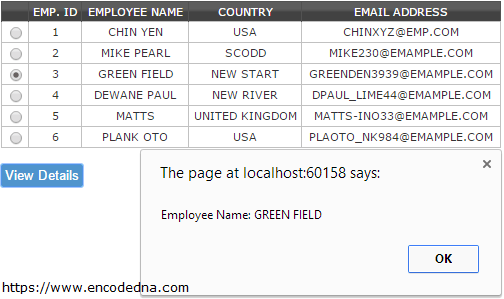
We have used the GridView control in Asp.Net for various purposes in our projects, repeatedly for a very long time now. However, we know that most of its features are available at the server side. Using jQuery, we can do some useful validations on a GridView control at the client side itself.In this article I am going to show you how you can use jQuery to validate and check if any GridView row with RadioButton has been selected (or checked). A RadioButton in a GridView control, allows users to select one row at a time.
I'll add a "button" control in my project and the button's Click event will execute the validation process.
$('#btView').click(function() {
    var bSelected = true;
    var sEmpName;
    $('#gvDime').find('input:radio').each( …
});
Note: Also in this article, we will see how to restrict single radio button selection using a function written in jQuery.
Add GridView and other Controls
Start "Visual Studio" and from the File menu open "New Web Site" and select Asp.Net Web Site. Choose the language you are comfortable.
➡️ This article has code written in C# and VB.
Add a GridView control along with a SqlDataSource control from the toolbox. We will bind the GridView with a database table using SqlDataSource to show data.
Once you have hooked the GridView control to the database, add a column with a RadioButton at beginning of the GridView.
<Columns>
    <%--ADD THIS COLUMN AFTER BINDING THE GRID WITH SQLDATASOURCE--%>
    <asp:TemplateField>
        <ItemTemplate>
            <asp:RadioButton runat="server" id="rbEmp" OnClick="javascript:check(this.id)" />
        </ItemTemplate>
    </asp:TemplateField>
</Columns>
<!DOCTYPE html>
<html>
<head>
    <title>Validate GridView using jQuery</title>
    <script src="https://ajax.googleapis.com/ajax/libs/jquery/1.7.1/jquery.min.js"></script>

    <%--STYLE THE GRIDVIEW--%>
    <style type="text/css">
        .grid {
            width:100%;
            background-color:#FFF;
            border:solid 1px #525252;
        }
        .grid td {
            padding:2px;
            border:solid 1px #C1C1C1;
            color:#333;
            text-align:center;
            text-transform: uppercase;
        }
        .grid th {
            padding:3px;
            color:#FFF;
            background:#424242 url(grd.png) repeat-x top;
            border-left:solid 1px #525252;
            text-align:center;
            text-transform:uppercase;
        }
        input {
            width:auto;
            background-color:#4F94CD;
            color:#FFF;
            padding:3px;
            border:solid 1px #4F94CD;
            border-radius:3px; -moz-border-radius:3px; -webkit-border-radius:3px;
            cursor:pointer;
        }
    </style>
</head>
<body>
    <div>
        <%--THE GRIDVIEW CONTROL.--%>
        <asp:GridView ID="gvDime" runat="server" CssClass="grid" GridLines="None"
            AutoGenerateColumns="False"
            DataSourceID="SqlDataSource1">

            <Columns>
                <%--ADD "radiobutton" COLUMN AFTER BINDING THE GRID WITH SQLDATASOURCE--%>
                <asp:TemplateField>
                    <ItemTemplate>
                        <asp:RadioButton runat="server" id="rbEmp"
                            OnClick="javascript:check(this.id)" />
                    </ItemTemplate>
                </asp:TemplateField>

                <%--FIELDS OF DATABASE TABLE WHICH WAS BOUND USING "SQLDATASOURCE"--%>
                <asp:BoundField DataField="EmpID" HeaderText="Emp. ID"
                    SortExpression="EmpID" />
                <asp:BoundField DataField="EmpName" HeaderText="Employee Name"
                    SortExpression="EmpName" />
                <asp:BoundField DataField="Country" HeaderText="Country"
                    SortExpression="Country" />
                <asp:BoundField DataField="Email" HeaderText="Email Address"
                    SortExpression="Email" />
            </Columns>

        </asp:GridView>

        <asp:SqlDataSource ID="SqlDataSource1" runat="server"
            ConnectionString="<%$ ConnectionStrings:DNA_CLASSIFIEDConnectionString %>"

            SelectCommand="SELECT [EmpID], [EmpName], [Country], [Email] FROM [EmployeeDetails]">
        </asp:SqlDataSource>
    </div>
    <p><input type="button" id="btView" value="View Details" /></p>
</body>
jQuery script using .each(), .find(), .not(), .attr()
<script>
    // SELECT SINGLE RADIO BUTTON ONLY.
    function check(objID) {
        var rbSelEmp = $(document.getElementById(objID));
        $(rbSelEmp).attr('checked', true);      // CHECK RADIO BUTTON WHICH IS SELECTED.

        // UNCHECK ALL OTHER RADIO BUTTONS IN THE GRID.
        var rbUnSelect =
            rbSelEmp.closest('table')
                .find("input[type='radio']")
                .not(rbSelEmp);

        rbUnSelect.attr('checked', false);
    }
    $('#btView').click(function() {
        var bSelected = true;
        var sEmpName;

        // CHECK EACH ROW FOR THE SELECTED RADIO BUTTON.
        $('#gvDime')
            .find('input:radio')
            .each(function() {

            var name = $(this).attr('name');

            if ($('input:radio[name=' + name + ']:checked').length == 0) {
                bSelected = false
            }
            else {
                // GET THE EMPLOYEE NAME (3rd COLUMN) FROM THE ROW WHICH IS CHECKED.
                sEmpName = $('input:radio[name=' + name + ']:checked').closest('tr')
                    .children('td:nth-child(3)')
                    .map(function() {

                    return $.trim($(this).text());
                }).get();
            }
        });

        // FINALLY SHOW THE MESSAGE.
        if (bSelected == false) {
            alert('Invalid Selection'); return false
        }
        else
            alert('Employee Name: ' + sEmpName);
    });
</script>
</html>