Ref: You can read more about the StreamReader Class here.
The StreamReader Class in Asp.Net provides many useful methods and properties to read lines of information from a standard text file.
What is CSV?
CSV stands for Comma Separated Values, a format where text values are separated using commas. For example, below is 3 different values (or texts) separated by commas.
001,Rock Pigeon,Dove
Note: You can open a .csv file using any text editing application such as Notepad.
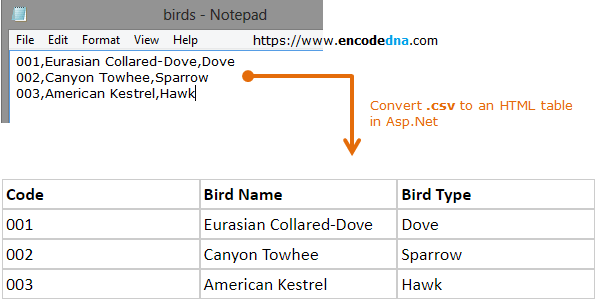
So, I have a list of birds with unique ids, name and type. It is saved in a .csv file called birds.csv.
001,Eurasian Collared-Dove,Dove
002,Canyon Towhee,Sparrow
003,American Kestrel,Hawk
Using StreamReader class methods, I can easily extract the CSV data and write it on my web page for viewing.
In the markup section, I have <div> element, where I’ll write the CSV data. This is optional. You can use other methods to deal with the data, like saving it to a database, or show the csv values in a table etc.
<style>
    .header, .d {
        display: inline-table;
        width: 30%;
        border: solid 1px #CCC;
        padding: 3px;
    }
    .header {
        font-weight: bold;
    }
</style>

<!--show csv values here-->
<div id="birds" runat="server" style="width:50%;"></div>
using System;
using System.IO;

public partial class SiteMaster : System.Web.UI.MasterPage
{
    protected void Page_Load(object sender, EventArgs e)
    {
        // Be carefule with backward and forward slash in file path.
        readCSV_Data("d:/birds.csv");
    }

    private void readCSV_Data(string sfileName)
    {
        // CREATE AN INSTANCE OF StreamReader TO READ THE FILE.
        using (StreamReader sr = new StreamReader(sfileName))
        {
            // First, create the header.
            birds.InnerHtml = "<div class='header'>Code</div><div class='header'>Bird Name</div><div class='header'>Bird Type</div>";

            do
            {
                string s = sr.ReadLine();           // Read line of characters from the stream.
                string[] arrData = s.Split(',');    // Store values in the array for later use.

                // Read each value in the array.
                for (int i = 0; i <= arrData.GetUpperBound(0); i++)
                {
                    birds.InnerHtml = birds.InnerHtml + "<div class='d'>" + arrData[i] + "</div>";
                }

                birds.InnerHtml = birds.InnerHtml + "<br />";     // Go to the next line.

            } while (!(sr.EndOfStream));
        }
    }
}
I am creating an Instance of StreamReader to read the data from the file. Using the ReadLine() method, I am storing each character in a string.
Option Explicit On
Imports System.IO

Partial Class Site
    Inherits System.Web.UI.MasterPage

    Protected Sub Page_Load(sender As Object, e As System.EventArgs) Handles Me.Load
        readCSV_Data("d:/birds.csv")
    End Sub

    Private Sub readCSV_Data(ByVal sfileName As String)
        ' CREATE AN INSTANCE OF StreamReader TO READ THE FILE.
        Using sr As New StreamReader(sfileName)

            ' THE HEADER.
            birds.InnerHtml = "<div class='header'>Code</div><div class='header'>Bird Name</div><div class='header'>Bird Type</div>"

            Do
                Dim arrData() As String = sr.ReadLine.Split(",")	' SPLIT AND STORE VALUES IN THE ARRAY.

                ' READ VALUES FROM THE ARRAY.
                For i = 0 To UBound(arrData)
                    birds.InnerHtml = birds.InnerHtml & "<div class='d'>" & arrData(i) & "</div>"
                Next

                birds.InnerHtml = birds.InnerHtml & "<br />"  ' GO TO THE NEXT LINE.

            Loop Until sr.EndOfStream
        End Using
    End Sub
End Class
This is how it will look.