
Last updated: 25th September 2026
Exception handling, also known as error handling, is a crucial process in SQL Server for managing errors that occur during the execution of T-SQL statements, stored procedures or triggers. Similar to exception handling techniques in programming languages like C#, SQL Server provides a structured approach to handling errors efficiently.In this article, we will explore how to implement error handling in SQL Server using the TRY...CATCH statement, a powerful mechanism that helps developers manage exceptions gracefully and maintain database integrity.
Syntax
BEGIN TRY
    SQL Statement
END TRY

BEGIN CATCH
    Error Messages, SQL Statement
END CATCH
Exception handling (or error handling) procedure in SQL Server, involves the use of two different blocks, named TRY and CATCH.
You should write your T-SQL query or statement (which you think might throw an error), inside the TRY block. If an exception occurs during the execution of the statement inside the TRY block, the control will automatically shift to the CATCH block, where the error will be handled and shown a message.
Example:
A Try...Catch statement in SQL Server will look like this. 👇
BEGIN TRY
    INSERT INTO Books (BookName, Category, Price)
        SELECT 'Python for beginners', 'Computers', 'Five Hundred'
END TRY

BEGIN CATCH
    SELECT ERROR_MESSAGE() AS ErrorMessage;
END CATCH
The INSERT statement (in the above example) is within the TRY block. If the statement throws an error, it will be caught and the control immediately shifts to the CATCH block, where the error is captured and displayed. This structured approach to error handling helps developers maintain database integrity and prevent unexpected failures.
Now, I am excepting an error in the above INSERT statement, because the Price column excepts only numbers or numeric values. However, the value I am trying to insert is a string ('Five Hundred'). See the Books table
You must handled Errors or Exceptions with utmost care in SQL Server. Exceptions do happen and you should know how to handle it.
By now, you understand the critical role of error handling in SQL Server. Unhandled errors can disrupt database operations, compromise data integrity and create significant challenges for DBAs and database developers, often leading to sleepless nights trying to resolve unexpected failures.
💡 However, there is a plus point too. Errors, often give us an "insight of a situation" and so it is always advisable to log errors, if at all they ever occur during a process.
👉 What are some Best Practices For Exception (Error) Handling in SQL Server?
Implementing exception hanlding in a Stored Procedure
Try...Catch blocks can be added within Stored Procedures and Triggers in SQL Server.
Here's another example of exception handling. I want to insert some data in my Books table. And this time, I'll use a stored procedure to insert data. The procedure have Try…Catch block to handle the errors. We will not pass any parameters to the procedure and rather use fixed values.
CREATE PROCEDURE Exception_Demo
AS
    BEGIN TRY
        INSERT INTO dbo.Books (BookName, Category, Price, Price_Range)
            SELECT 'Learning OpenCV', 'Computers', 'Two Hundred', '200-500'
    END TRY

    BEGIN CATCH
        SELECT ERROR_MESSAGE() AS ErrorMessage;
    END CATCH
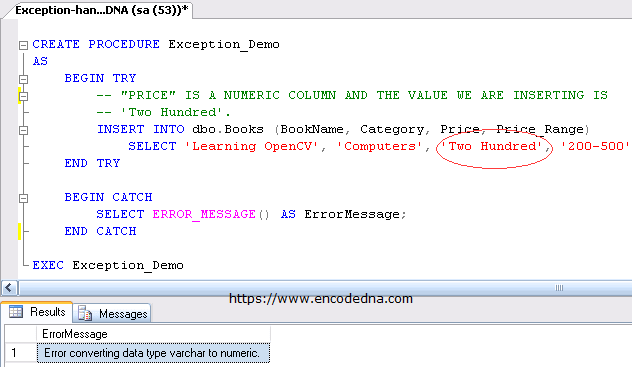
Executing the above Stored Procedure will throw an error, because the Price column excepts only numbers or numeric values, and is caught and control goes to the CATCH block.
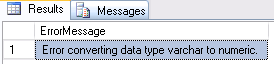
Error Information using "system functions"
The error message shown in the above example is a system-generated message. Moreover, this message is displayed after collecting information about the error using a system function called the ERROR_MESSAGE().
SQL Server has six predefined system functions used in the "CATCH" block.
1) ERROR_MESSAGE() – This function will return a "text" message explaining the error. We can embed or add our own message along with the predefined message.
BEGIN TRY
    SELECT 1/0
END TRY
BEGIN CATCH
    SELECT 'AN ERROR OCCURED: ' + ERROR_MESSAGE() AS Custom_Error
END CATCH
The result is "AN ERROR OCCURED: Divide by zero error encountered."
2) ERROR_NUMBER() - Returns the number of the error. Normally these numbers work as conditions in the "CATCH" block, which helps writing custom messages. Every SQL Server error has uniquely defined error messages along numbers.
Note: To see all the system errors, run the below query.
3) ERROR_SEVERITY() - Returns the severity of the error. While executing the above query you might have noticed the second column named "severity". This indicates the nature of the error.
SELECT DISTINCT severity
FROM master.dbo.sysmessages
ORDER BY severity
Now let's run the statement again, which we have written in the first function above. However, we will add and remove couples lines to understand it better.
BEGIN TRY
    SELECT 1/0
END TRY
BEGIN CATCH
    SELECT 'ERROR SEVERITY: ' + CAST(ERROR_SEVERITY() AS VARCHAR(2)) AS Error
END CATCH
The result is "ERROR SEVERITY: 16".
Severity level 16 indicates that the error has occurred due to a user problem and it can be fixed by the user.
MSDN has the entire list of “Severity” levels defined.
For 2014 – MSDN Database Engine Error Severities
For 2000 and Above – MSDN Error Message Severity Levels
4) ERROR_STATE() This function will return an Integer value that indicates the exact location in the code where the error has occured. In a multi user environment, the “state” of the error can help locate and diagnose errors with ease.
SELECT ERROR_STATE() AS ErrorState
5) ERROR_PROCEDURE() Returns the name of the procedure that threw the error. You can experiment this function with the procedure (Exception_Demo) we have written before. Just add the following line inside the catch block.
SELECT ERROR_PROCEDURE() AS Stored_Procedure
If it is not a procedure, but a query then it will return as NULL.
6) ERROR_LINE() Returns the line number where the actual error has occurred. This helps developers to pinpoint the place or error (code) and fix it.
Best Practices for TRY...CATCH
When using TRY...CATCH with transactions, always make sure an active transaction is rolled back when an error occurs. XACT_STATE() can be used to check the transaction state, while THROW re-raises the error so the calling application can handle it.
BEGIN TRY
    BEGIN TRANSACTION
    -- Your SQL statements, like UPDATE etc.
    COMMIT TRANSACTION
END TRY
BEGIN CATCH
    IF XACT_STATE() <> 0
        ROLLBACK TRANSACTION

    THROW
END CATCH
Here, XACT_STATE() helps determine whether a transaction is still active and whether it can be committed. If an error has made the transaction uncommittable, it must be rolled back before the error is passed back to the caller.
The THROW statement is also important because it allows the original error to be propagated to the calling application or procedure. Simply displaying ERROR_MESSAGE() inside the CATCH block may hide the fact that an operation failed.
The purpose of exception handling using TRY...CATCH is not only to provide meaningful error information, but also to handle errors safely and maintain data consistency. When working with transactions, XACT_STATE() can be used to determine the transaction state, while THROW can re-raise the error for the calling application to handle.
TRY...CATCH blocks can also be nested, allowing one TRY...CATCH block to be placed inside another. The CATCH block can contain SQL statements, making it possible to perform additional error handling or logging when an error occurs.